Activity 5: Finance and Business Decision Making
Business Studies Grade 11
Activity Purpose
To develop learners' financial reasoning and decision-making skills by managing a virtual café enterprise through an Excel spreadsheet model, manipulating variables and observing real-time consequences of business decisions.
Learner Engagement
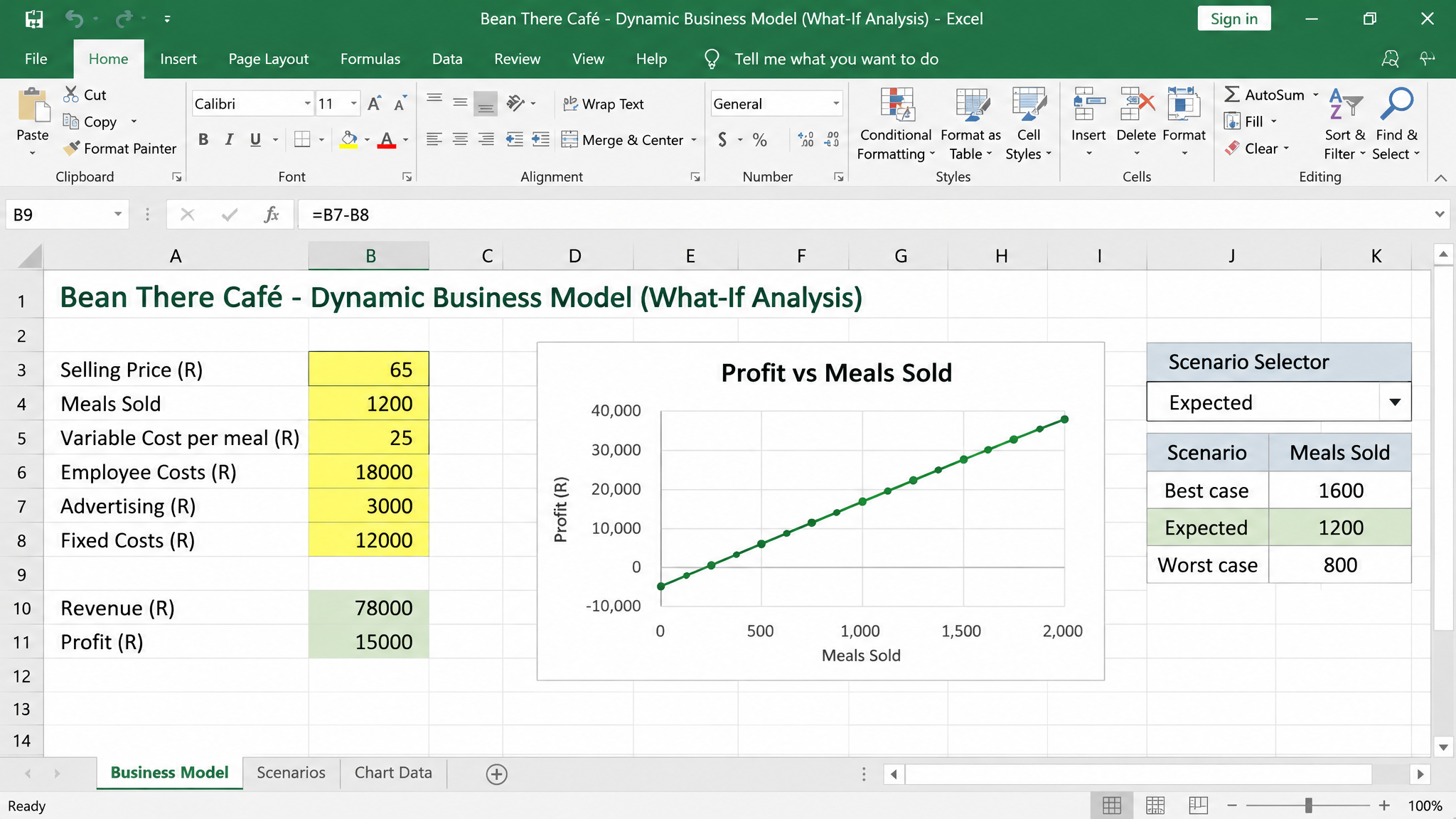
Learners manage Bean There Café, a virtual enterprise modelled in Excel. They manipulate variables including selling price, meals sold, variable costs, employee costs, advertising spend, fixed costs, revenue, and profit to explore business decision-making.
Teacher Role
The teacher introduces the virtual enterprise, explains the spreadsheet model structure, guides experimentation, facilitates discussion of findings, and assesses the analytical report.
Digital Tools
Microsoft Excel (spreadsheet modelling and simulation)
Activity Brief
Scenario: Bean There Café , Learners take on the role of business managers, using an Excel model to run experiments and make strategic decisions.
The model includes these variables that learners can manipulate:
- Selling Price per meal
- Number of Meals Sold per month
- Variable Cost per meal
- Employee Costs (monthly)
- Advertising Spend (monthly)
- Fixed Costs (rent, utilities)
Learners run three structured experiments:
- Pricing Strategy Experiment: A 10% price increase leads to reduced demand. Learners observe the tension between higher margins and lower volume, discovering that price elasticity affects total revenue.
- Advertising Strategy Experiment: Increasing the advertising budget by R5,000 brings 150 additional meals per month. Learners calculate whether the increased revenue justifies the advertising spend.
- Sales Growth Experiment: Scaling from 1,000 to 1,250 meals per month. Learners discover how increased volume affects variable costs, capacity constraints, and overall profitability.
Example of Learner Work
An illustration of how the completed activity looks using the digital Mind Tool.
MindTool Characteristics
How this activity demonstrates the three defining features of cognitive tools.
Representation
The Excel model represents the business as a system of interconnected variables. Cells, formulas, and calculated outputs simulate how a real café operates, making abstract financial concepts concrete and manipulable.
Distributed Cognition
Cognitive work is shared between the learners (strategic thinking, hypothesis generation), the Excel model (calculations, scenario processing), and the teacher (scaffolding, guided inquiry). No single agent holds all the intelligence.
Interactivity
Learners manipulate variables and immediately see real-time results. This "what if" exploration , changing prices, adjusting budgets, scaling production , creates a dynamic feedback loop that deepens financial understanding.